OSINT · Tooling
Beyond the Search Bar: A Practitioner's Look at OpenOSINT
⚠ Legal notice
OpenOSINT is for legal, authorized security research only. You are solely responsible for compliance with applicable laws. Always obtain written authorization before investigating any target. The tool's authors accept no liability for misuse.
If you have been doing OSINT for more than a few months, you already know the rhythm. Pull up a breach lookup tab. Open a separate terminal for Sherlock. Copy a username, paste it into yet another browser window, grab those results, paste them into a doc. Repeat until your clipboard history becomes a crime scene.
I have been in that loop. Eighteen-plus years in network and security work, and the single biggest friction point in OSINT has never been a lack of data — it is the sheer mechanical overhead of coordinating a dozen tools that have no idea the others exist. OpenOSINT is the most credible attempt I have seen to solve that problem at the workflow level rather than the tool level.
What OpenOSINT actually is
The one-sentence version: it is an AI agent that drives OSINT tooling the same way you would, except it does not lose focus, does not forget to pivot, and does not need coffee.
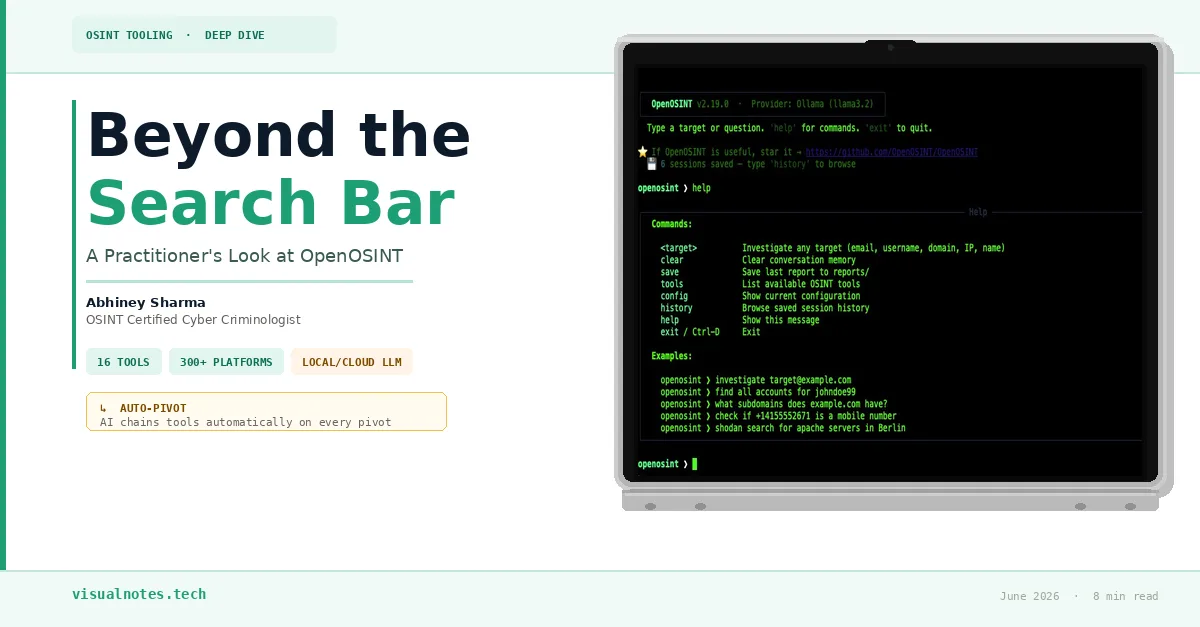
More precisely, it is an orchestration layer that sits between a Large Language Model — either a local Llama 3.2 via Ollama, or a cloud model like Claude 3.5 via API — and a suite of 16 purpose-built OSINT binaries. When you give it a target, the model decides which tool to run first, reads the real output from your system, reasons about what it found, and decides what to run next. That last part is the piece that matters most.
This is what practitioners call tool chaining. If the model discovers a GitHub username while investigating an email address, it does not stop and ask you what to do. It pivots — automatically triggering a username sweep across 300-plus platforms — because it recognized that the username was a pivot point worth following. That is not a scripted rule; the model is making that call dynamically based on what it found.
Installation (macOS M1)
The setup has two distinct parts: the Python framework and the AI model. Neither is complicated, but they have to be done in the right order.
Step 1 — Package manager and languages
/bin/bash -c "$(curl -fsSL https://raw.githubusercontent.com/Homebrew/install/HEAD/install.sh)"
brew install python git
Step 2 — The AI model (Ollama)
Download the Ollama app from ollama.com, launch it, then pull the recommended model:
ollama run llama3.2Step 3 — Clone and isolate the framework
git clone https://github.com/OpenOSINT/OpenOSINT.git
cd OpenOSINT
python3 -m venv venv
source venv/bin/activate
Step 4 — Install dependencies and OSINT binaries
pip install ollama fastapi uvicorn requests python-dotenv pydantic rich \
  aiohttp beautifulsoup4 pandas fpdf openai dnspython prompt_toolkit \
  anthropic google-generativeai pyyaml holehe reportlab sherlock-project sublist3r
Step 5 — Configure and launch
Create a .env file and add your API keys (Serper for Google search integration is the main one). Then launch:
python -m openosint.cli --provider ollamaThree ways to interact with it
OpenOSINT exposes three interfaces depending on how you work:
Terminal REPL
Command-line chat session for live investigations. Low overhead, fast feedback loop.Best for: active target work, quick pivots
Web UI
Browser-based interface with tool cards and streaming output.
openosint web to launch.Best for: sharing results with a team, easier reading of structured outputMCP Server
Integrates directly into Claude Desktop via Model Context Protocol. The AI uses all 16 tools natively from within Claude's interface.Best for: power users already in the Claude ecosystem
The 16 tools under the hood
This is where most reviews stop at a list of names. I want to be more specific about what each category actually gives you during an investigation.
holehe
Checks whether an email is registered across hundreds of services. Your first move on most targets.
sherlock
Username enumeration across 300+ platforms. Highly effective after a holehe pivot surfaces a handle.
sublist3r
Subdomain enumeration. Maps out the full surface area of an organization's web infrastructure.
python-whois
Domain registration and ownership lookups. Useful for attribution when pivoting from infrastructure.
dnspython
Full DNS record analysis: A, MX, TXT, NS. Useful for mail infrastructure and hosting attribution.
Shodan / Censys
Internet-wide scanning databases. Show open ports, services, and banners on any IP target.
VirusTotal
Multi-engine reputation checks for IPs, domains, and hashes. Good for quick badness assessment.
AbuseIPDB
Community-reported abuse history for IP addresses. Cross-reference with Shodan for context.
HaveIBeenPwned
Breach history for email targets. Knowing which breach events apply shapes the rest of the investigation.
psbdmp.ws
Pastebin dump search. Surfaces leaked credentials, code, or configuration data tied to your target.
A real pivot workflow: email to digital profile
The documentation example is a good one, so I want to walk through it with practitioner commentary rather than just listing steps.
You start with one input: target@example.com. You type one prompt: "Investigate this email and build a digital profile."
Action 1
Runs
search_email via holehe. Returns: registered on Spotify and GitHub.The GitHub registration is the key finding here — it implies a public username.Action 2
Model recognizes the GitHub username
TargetUser99 as a pivot point. Automatically triggers search_username via Sherlock across 300+ platforms.This pivot is the part you used to do manually. The model is making that call unprompted.Action 3
Surfaces a linked Twitter account. Runs
search_breach to check for credential exposure associated with the email.Cross-referencing social presence with breach data is standard methodology — the model is following it correctly.Output
Compiles all findings into a structured PDF report with source attribution.The report is the deliverable you would otherwise spend an hour writing by hand.
The critical difference between this and a script is that a script follows a fixed path. The model follows the evidence. If Sherlock returned nothing, it would not generate an empty report — it would reason about what that absence means and try a different angle. That flexibility is what makes agentic frameworks meaningfully different from automation.
Local vs. cloud inference: the real trade-off
This is the decision that matters most operationally, and it is not primarily a quality question — it is a data exposure question.
Local inference (Ollama + Llama 3.2)
Everything runs on your machine. Target identifiers, query logic, tool outputs — none of it leaves your system. For sensitive investigations, authorized red team work, or any situation where operational security matters, this is the only rational choice. The reasoning quality is lower than cloud models, but it is good enough for most structured workflows.
Cloud inference (Claude / OpenAI API)
Noticeably better at complex multi-hop reasoning and synthesizing ambiguous findings into coherent assessments. The trade-off is that your queries and tool outputs are transmitted to the provider. Acceptable for benign research with non-sensitive targets. Requires paid API access and a clear understanding of the provider's data handling policy.
Where this fits in the broader picture
OSINT has always had a tooling problem and a workflow problem. The tooling problem is largely solved — we have good individual tools for almost every pivot type. The workflow problem is what OpenOSINT is actually attacking. By moving the orchestration burden to the model, you shift your cognitive load from "which tool do I run next" to "is the model following the right thread." That is a meaningful improvement in how you spend your attention during an investigation.
It is not magic. The model can make wrong pivots, miss obvious connections, or generate a tidy-looking report from incomplete data. Your job as the analyst does not disappear — it shifts upstream toward framing better queries and downstream toward critically evaluating what the model concluded and why. If you approach it as a tool that handles mechanics so you can focus on analysis, it delivers on that promise.
If you have explored related methodology, the pivot patterns here map closely to what I covered in the Viper-Ghost case file and the Lazarus Dream Job analysis linked below.